Estimated reading time: 13 minutes
Key takeaways
- Human in the loop ITSM keeps people involved at key decision points while AI handles routine, repeatable work.
- AI should not be treated as either fully manual support or full autonomy. The safest model is risk-based automation.
- AI agent approvals are essential for privileged access, production changes, major incidents, regulated data, sensitive communications, and low-confidence recommendations.
- ServiceNow AI governance and HaloITSM automation controls should include ownership, data access rules, audit logging, monitoring, escalation paths, and rollback options.
- Escalation rules help AI stop at the right moment, so urgent, sensitive, or uncertain work reaches the right human or specialist team.
- The goal is not to slow AI down. The goal is to make automation safer, more accountable, and easier to trust.
Why human in the loop ITSM matters now
Human in the loop ITSM is becoming essential as service teams adopt AI agents, workflow automation, and smarter service desk tools. Platforms such as ServiceNow and HaloITSM now help teams automate ticket triage, summarisation, routing, request fulfilment, knowledge suggestions, and user support across portals, chat, and email.
For teams exploring AI for ITSM, the key challenge is not only what to automate, but also where human judgement must remain in control.
Full automation can create risk when decisions affect business-critical services, security access, production changes, regulatory obligations, or customer-facing communications.
Human in the loop ITSM is a service management operating model where AI and automation execute within defined guardrails, while humans remain involved at key decision points for review, approval, override, and escalation.
In practice, this means a HITL AI agent can speed up routine work, while AI agent approvals, ServiceNow AI governance, HaloITSM automation controls, and escalation rules keep high-risk actions safe, accountable, and auditable.
What is human in the loop ITSM?
Human in the loop ITSM is an IT service management model where AI and automation perform tasks such as classification, summarisation, recommendations, routing, and workflow execution, while humans remain embedded at key decision points for review, approval, override, and escalation.
This model does not mean every ticket needs manual review. Instead, it means humans step in where risk, uncertainty, sensitivity, or business impact is high. Meanwhile, automation can still run freely for low-risk, repeatable work.
There are three common operating modes:
- Fully manual ITSM: Humans perform all triage, routing, approvals, and actions. This gives strong control, but it can be slow, costly, and inconsistent.
- Fully automated ITSM: AI and rules execute most decisions with little oversight. This is fast and scalable, but errors can spread quickly.
- Human in the loop ITSM: AI handles low-risk, high-volume work, while workflows pause for human review when impact or uncertainty increases.
This balanced model supports controlled automation. For example, AI can categorise a low-priority printer issue automatically. However, if AI detects a possible P1 email outage, the incident manager should confirm the severity before major incident workflows and communications begin.
Because ITSM teams often align with structured service management practices, ITIL best practices remain useful when designing approval, escalation, incident, request, change, and continual improvement controls.
Why AI oversight matters in service management
AI oversight matters because ITSM workflows often touch production systems, identity access, customer data, employee records, enterprise applications, and regulated services. Therefore, a single automated mistake can cause outages, data exposure, SLA breaches, or audit findings.
Common risks include:
- Wrong ticket priority: AI may classify a major incident as a low-priority issue.
- Incorrect routing: A ticket may go to the wrong support group, delaying resolution.
- Unsafe recommendations: AI may suggest restarting a service without understanding business impact.
- Unauthorised fulfilment: Automated workflows may grant access without the right approval.
- Poor change decisions: AI may miss dependencies, blackout windows, or production risk.
- Weak accountability: Teams may fall into the dangerous mindset of “the AI did it.”
Human oversight reduces these risks because it creates checkpoints. Approval workflows show who authorised an action. Escalation rules prevent AI from continuing when it is uncertain. Audit logs show what AI recommended, what a human approved, and what happened after execution.
Additionally, IT leaders should treat AI governance as part of wider operational governance. Industry analysis from Gartner often highlights the need to balance innovation with risk control, and that principle applies directly to AI-enabled ITSM. Faster service is valuable, but accountable service is essential.
What a HITL AI agent does in ITSM
A HITL AI agent is an AI-driven assistant, virtual agent, triage bot, or automation worker that can perform ITSM tasks, but is configured to pause, request approval, escalate, or allow human override before critical actions are executed.
For example, a HITL AI agent can help with:
- Ticket summarisation: It condenses long ticket histories, chat transcripts, and monitoring alerts.
- Suggested responses: It drafts replies for agents to review before sending.
- Incident classification: It suggests category, service, configuration item, priority, and resolver group.
- Knowledge recommendations: It proposes relevant articles for users or service desk agents.
- Request preparation: It gathers missing details, checks catalog rules, and prepares fulfilment tasks.
- Change risk analysis: It compares similar changes and highlights possible impact.
- Routing and prioritisation: It recommends the right queue and urgency level.
However, the difference between advisory and autonomous behaviour is important. A HITL AI agent is not fully autonomous if it must stop for approval in defined scenarios. Likewise, it is not merely advisory if it can prepare workflow actions.
For instance, AI may prepare access for a new employee. Nevertheless, a manager or system owner should approve before provisioning begins. Similarly, AI may draft a customer-facing outage update, but a service desk lead should review tone, accuracy, and business impact first.
For teams comparing ITSM platform capabilities, Atlassian’s ITSM guidance also shows how service management workflows can combine automation, collaboration, and structured process control.
Where AI agent approvals should be used
AI agent approvals are workflow controls that require a human to review and approve an AI-initiated or AI-recommended action before execution. They are one of the most important safeguards in human in the loop ITSM.
Approvals should be risk-based, not blanket rules. If every AI action needs approval, automation becomes slow and frustrating. However, if high-risk actions bypass approval, the organisation may create security, compliance, or operational exposure.
Use AI agent approvals when actions involve:
- Privileged access, such as admin, root, cloud administrator, or production database rights.
- Sensitive systems, including HR, finance, legal, R&D, customer data, or regulated platforms.
- Production changes, firewall changes, identity changes, or security controls.
- Major incident declaration and customer-facing outage communications.
- High-cost software, infrastructure, or hardware requests.
- Low-confidence AI recommendations.
- VIP users, executive users, or business-critical services.
A simple tiered model works well:
| Risk level | AI role | Examples | Required controls |
|---|---|---|---|
| Low | AI can act automatically | Knowledge suggestion, low-priority categorisation, standard acknowledgement | Logging, sampling, easy rollback |
| Medium | AI prepares or recommends | Standard software request, internal update, non-privileged group change | Conditional approval, audit trail, override |
| High | AI is advisory only | Privileged access, production change, major incident communication | Mandatory approval, strong audit trail, rollback |
| Very high | AI summarises only | Legal, HR, breach, executive-impacting decisions | Senior human decision, compliance review |
Consequently, the risk level determines when AI acts, when it waits, and when it escalates.
Human in the loop ITSM by process area
Human in the loop ITSM becomes practical when applied to each ITSM process area. Although the controls vary, the principle stays the same: AI accelerates routine work, while people retain accountability for high-impact decisions. ITIL Foundation guidance provides a useful process context for incident management, service request management, change enablement, problem management, and continual improvement.
In incident management, AI can classify incidents, summarise alert data, suggest known errors, detect duplicates, and recommend routing. However, humans should review major incidents, P1/P2 issues, business-critical services, low-confidence classifications, VIP impact, and customer-facing communications.
In request management, AI can help users choose catalog items, collect missing details, validate fields, and fulfil standard low-risk requests. Nevertheless, human approval should remain for privileged access, sensitive systems, high-cost items, policy exceptions, and non-standard software or hardware.
In change enablement, AI can suggest change type, identify affected services, detect conflicts, and draft implementation or back-out plans. Yet production-impacting, emergency, security-related, or regulated changes should still require change manager, CAB, service owner, or security approval.
In problem management, AI can cluster recurring incidents and suggest probable root causes. However, humans should validate evidence before corrective action.
In knowledge management, AI can draft articles and FAQs. Still, technical owners should approve risky fixes, compliance content, and customer-facing instructions before publication.
ServiceNow AI governance considerations
ServiceNow AI governance means the policies, roles, controls, workflows, data access rules, approval mechanisms, logging, and monitoring practices used to manage AI capabilities safely inside the ServiceNow platform.
First, define ownership. Each AI use case should have a process owner, platform owner, service owner, and, where needed, a risk or compliance owner. Additionally, organisations should define who can configure AI capabilities, virtual agents, predictive models, workflow automations, and AI-supported recommendations. For organisations planning ServiceNow ITSM consulting and implementation, these ownership decisions should be built into the platform roadmap from the start.
Next, control data access. AI should only access the tables, fields, attachments, knowledge articles, CMDB records, user data, and ticket histories needed for the use case. Sensitive data should be classified and protected, especially when AI generates responses for agents or end users.
Then, define ServiceNow AI governance guardrails. For example, AI may recommend a change approval path, but it should not approve a high-risk production change alone. Likewise, AI may prepare a catalog fulfilment task, but privileged access should require manager, system owner, or security approval.
Logging is also critical. Teams should record the input context, AI recommendation, confidence level if available, human decision, approver, timestamp, override reason, and execution result. Consequently, auditors can trace what happened and who was accountable.
Finally, monitor outcomes. Track acceptance rates, override rates, low-confidence outputs, failed automations, complaints, and escalation volume. Broader IT research from Forrester supports the same practical message: governance, measurement, and ownership are essential when adopting enterprise technology at scale.
HaloITSM automation controls and safe workflows
HaloITSM automation controls are the workflow, rule, approval, notification, SLA, routing, and closure controls that determine when automation runs, who must approve key steps, and when tickets or requests should escalate.
For automated ticket routing, rules can assign tickets based on category, service, keywords, user department, impact, urgency, or configuration item. However, if AI confidence is low or the service is critical, the safer option is to route the ticket to a triage queue rather than auto-assign it.
For request workflows, approval stages should depend on cost, department, service, risk level, data sensitivity, and user role. For example, a standard software request under a cost threshold may proceed automatically. However, a non-standard finance application request should pause for manager, system owner, or security approval.
SLA-based actions are also powerful. Automation can trigger notifications, priority changes, assignment changes, or escalations when deadlines approach. Nevertheless, AI-driven reprioritisation should be visible, reversible, and logged.
Closure controls matter too. Automation may propose closure for low-risk resolved tickets after user confirmation or inactivity. However, major incidents, VIP tickets, complaints, security incidents, and sensitive HR or legal requests should require human confirmation before closure.
Additionally, every automation should have an owner, test history, rollback path, exception process, and review cycle. Teams designing ITSM automation and orchestration in HaloITSM should treat these safeguards as part of workflow design, not as afterthoughts. The ISO 20000 service management standard reinforces the value of controlled, documented service management practices.
The role of escalation rules
Escalation rules are predefined conditions that determine when a ticket, request, incident, change, or AI-driven action should be passed to a human, specialist team, or higher level of authority.
In human in the loop ITSM, escalation rules define when AI must stop acting alone. They prevent AI agents from getting stuck, repeating failed fixes, misrouting urgent issues, acting outside authority, or failing silently.
Useful escalation triggers include:
- Low AI confidence score.
- Repeated failed resolution attempts.
- VIP or executive user.
- SLA breach risk.
- Security-sensitive request.
- Major incident indicators.
- Negative user sentiment.
- High change risk score.
- Compliance-sensitive keywords, such as legal, privacy, audit, HR, or finance.
There are two main escalation types. Functional escalation moves work to a team with deeper technical skill, such as sending a network outage ticket to Network Operations. Hierarchical escalation involves someone with decision authority, such as an incident manager, service owner, executive stakeholder, CAB, or security lead.
Both are needed. Functional escalation gets the right expertise involved. Meanwhile, hierarchical escalation gets the right authority involved. HDI’s service desk community also reflects this operational reality: support models need clear roles, handoffs, and accountability to work well under pressure.
Designing a risk-based human in the loop ITSM model
To design a human in the loop ITSM model, start by mapping where AI and automation are already used. Include incident triage, ticket routing, virtual agent interactions, request fulfilment, access workflows, change risk scoring, knowledge recommendations, automated closure, and SLA notifications.
Next, classify each action by risk. Consider operational impact, security impact, data sensitivity, financial cost, customer impact, compliance obligations, reversibility, AI confidence, and service criticality.
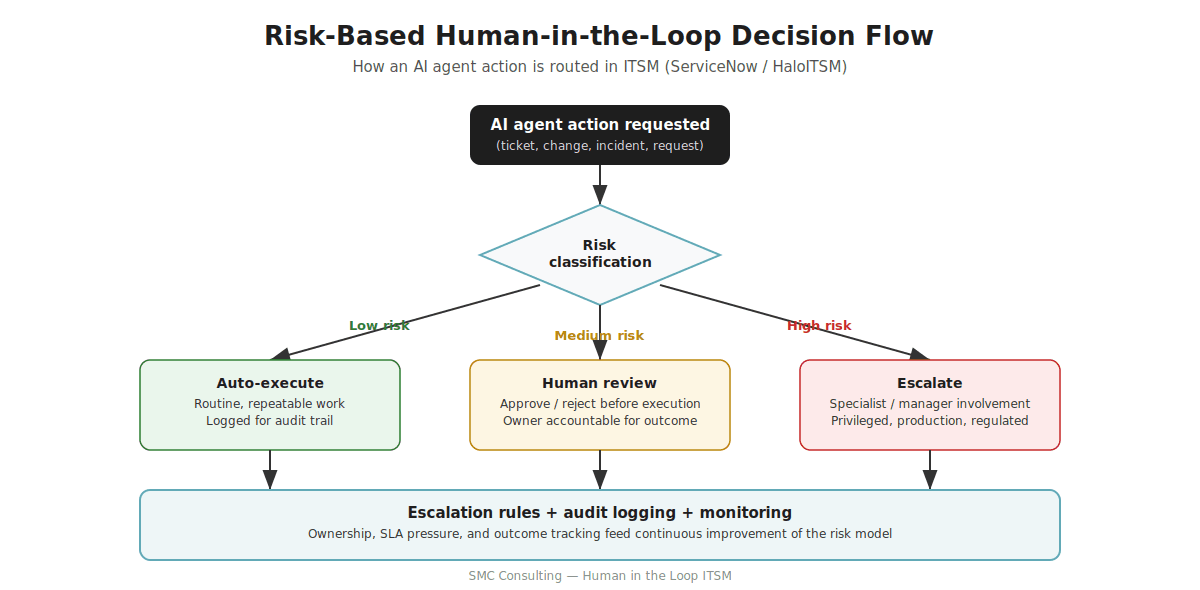
Then, define what can be fully automated. Good starting points include low-priority categorisation, knowledge article suggestions, standard acknowledgements, non-critical metadata updates, and routine password reset routing. Even then, logging should remain mandatory.
After that, define where human review is required. Typical examples include privileged access, production changes, major incidents, sensitive customer communications, security actions, high-cost requests, and low-confidence AI recommendations.
AI agent approvals should specify:
- Who approves.
- When approval is required.
- What context the approver sees.
- What happens after timeout.
- Whether rejection stops or reroutes the workflow.
- How decisions are logged.
Finally, build escalation rules for SLA risk, VIP users, low confidence, repeated failures, major incident indicators, security categories, and negative sentiment. Review results monthly or quarterly. If approval bottlenecks appear, remove unnecessary controls. However, if exceptions increase, add stronger guardrails. TechTarget’s ITSM coverage often emphasises this balance between process discipline, tooling, and continual improvement.
Common mistakes and success metrics
Several mistakes can weaken AI-enabled ITSM. First, some organisations automate too much too quickly. They move into access, change, or major incident workflows before proving AI accuracy on low-risk work. Instead, start with high-volume, low-risk tasks.
Second, some teams require approvals for everything. This creates delays, frustrates users, and hides the real value of AI. Therefore, use risk-based approvals rather than blanket controls.
Third, accountability is often unclear. Every AI use case should have an owner. Otherwise, no one knows who is responsible when AI makes a poor recommendation.
Fourth, audit trails are sometimes incomplete. Without logs, teams cannot prove what AI recommended, who approved it, whether it was changed, and what happened after execution.
Finally, escalation rules are often untested. If they route to unmonitored queues or unavailable approvers, high-risk work can stall.
Measure success with balanced KPIs, not just automation volume. Useful metrics include:
- First contact resolution rate.
- Mean time to resolution.
- Approval turnaround time.
- Escalation rate.
- AI recommendation acceptance rate.
- Override rate.
- Automation exceptions.
- SLA compliance.
- User satisfaction.
- Reopen rate.
- Audit or compliance findings.
- Major incident detection accuracy.
Together, these metrics show whether automation improves speed and quality without increasing operational risk.
Best practices for implementation
Start with low-risk, high-volume use cases. Good examples include ticket categorisation, ticket summarisation, password reset routing, standard request data collection, and knowledge article suggestions. Avoid beginning with privileged access, production changes, security actions, or major incidents.
Keep humans involved in critical decisions. For example, require human approval for major incident declaration, customer-facing communications, production change implementation, privileged access, and security containment actions.
Use clear approval thresholds. Define approval rules based on risk level, AI confidence, service criticality, data sensitivity, cost, user role, and regulatory impact. Additionally, document the approval matrix so agents, approvers, auditors, and platform administrators understand the model.
Create transparent audit logs. Each important AI-supported decision should capture the recommendation, human decision, approver identity, timestamp, execution result, and override reason.
Review escalation rules regularly. Test realistic scenarios such as SLA breach, failed AI resolution, VIP ticket, low-confidence classification, and sensitive access request. Also, confirm that escalation queues are staffed and monitored.
Train service desk teams. Agents need to know when to trust AI, when to challenge it, how to override it, and how to provide feedback.
Finally, align ServiceNow AI governance and HaloITSM automation controls with ITIL, security, compliance, change governance, and continual improvement. Human oversight should not block AI adoption. Instead, it should make AI adoption safer, clearer, and more trusted.
Practical example workflow
Consider an access request to a sensitive finance system. This is a strong example of human in the loop ITSM because the process needs speed, but it also needs control.
First, the user submits a request through a portal or chat. Next, the HITL AI agent gathers context, including the user’s role, department, requested access level, business justification, existing access, and whether the target system is sensitive.
Then, AI classifies the request as high risk because it involves finance data. Consequently, the AI prepares fulfilment tasks and recommends approvers, but it does not grant access.
The AI agent approvals route the request to the line manager and finance system owner. If privileged access is requested, the workflow also includes security or compliance approval.
Escalation rules then protect the process. If an approver does not respond within the defined period, the request escalates to a delegate or service owner. If AI detects unusual access patterns, it escalates to security.
After review, the human approver approves, rejects, or asks for more information. If approved, automation provisions access. If rejected, the workflow notifies the user and records the reason.
Finally, the system logs the AI recommendation, approvers, decisions, timestamps, and fulfilment result for audit and review.
How SMC Consulting can support
SMC Consulting helps organisations design safe, practical, and measurable AI-enabled ITSM models. Rather than treating AI as a tool-only project, SMC focuses on process maturity, governance, workflow design, and operational outcomes.
SMC can support human in the loop ITSM through:
- ITSM process design: Mapping incident, request, change, problem, and knowledge workflows to identify where AI can safely add value.
- AI governance frameworks: Defining risk tiers, ownership, approval models, monitoring practices, and exception handling.
- ServiceNow AI governance: Designing controls for approvals, logging, monitoring, data access, platform ownership, and AI-supported workflows.
- HaloITSM automation controls: Configuring safe workflows, approval rules, SLA actions, notifications, routing logic, and escalation paths.
- Workflow automation design: Building HITL workflows where AI accelerates routine work, while humans remain accountable for high-risk decisions.
- Escalation rule optimisation: Ensuring low-confidence AI outputs, SLA risks, VIP tickets, security-sensitive requests, and major incidents reach the right people.
- Approval model design: Creating risk-based approval matrices that avoid both over-automation and approval bottlenecks.
- ITSM maturity assessments: Reviewing current automation maturity and building a roadmap for safer AI adoption.
With the right model, AI can improve speed and consistency while preserving control, compliance, and trust.
Conclusion
Human in the loop ITSM is not a barrier to automation. Instead, it enables safer automation by allowing a HITL AI agent to handle low-risk, repeatable work while humans review, approve, override, or escalate high-risk decisions.
With AI agent approvals, ServiceNow AI governance, HaloITSM automation controls, escalation rules, risk-based automation, and continuous monitoring, organisations can improve speed without losing accountability.
Now is the right time to review your workflows. Where is AI already acting? Which actions are low, medium, or high risk? Are approvals and escalations clear, tested, and auditable? If you want help designing a tailored human in the loop ITSM model, speak with SMC Consulting.
About the author
Emmanuel Yazbeck is a Senior ITSM Consultant at SMC Consulting, specialising in ITIL4 implementation, ITSM workflow design, automation strategy, and AI-enabled service management across Belgium, France, and Luxembourg.
Emmanuel helps organisations design practical service management models that improve speed and consistency while preserving governance, auditability, and operational control. His work covers ServiceNow, HaloITSM, ITIL-aligned process design, automation governance, and human in the loop operating models.
Need help with AI-enabled ITSM? Contact SMC Consulting to discuss a safer, risk-based approach to ITSM automation.
Frequently asked questions
What is human in the loop ITSM?
Human in the loop ITSM is an operating model where AI and automation perform ITSM tasks, but humans remain involved at important decision points for review, approval, override, and escalation.
What is a HITL AI agent?
A HITL AI agent is an AI assistant or automation agent that can classify tickets, summarise information, recommend actions, or prepare workflows, but must involve a human before executing high-risk or sensitive actions.
When should AI agent approvals be required?
AI agent approvals should be required for actions involving privileged access, production changes, major incidents, customer-facing communications, regulated data, high-cost requests, or low-confidence AI recommendations.
What does ServiceNow AI governance include?
ServiceNow AI governance includes policies, ownership, configuration controls, data access rules, approval workflows, audit logging, monitoring, and exception handling for AI capabilities in ServiceNow.
What are HaloITSM automation controls?
HaloITSM automation controls are workflow rules, approvals, SLA actions, notifications, routing conditions, and closure safeguards that control when automation runs and when human intervention is required.
What are escalation rules in ITSM?
Escalation rules define when a ticket, request, incident, change, or AI-driven action should be moved to a human, specialist team, or higher authority due to urgency, risk, uncertainty, SLA pressure, or business impact.
Should all AI actions in ITSM require human approval?
No. Low-risk AI actions can often run automatically with logging. However, human approval should be reserved for medium- and high-risk actions involving security, compliance, cost, customer impact, or business-critical services.
How do you start implementing human in the loop ITSM?
Start by mapping where AI and automation are used, classifying actions by risk, defining approval thresholds, configuring escalation rules, logging decisions, and monitoring outcomes before expanding to higher-risk use cases.